Lessons from an LLM integration, part 1: prompt prefix caching
Are you interested in solutions to reduce token usage (and costs), improve response times, balance determinism and stochasticity, manage digital autonomy, correctness, and more? This is the first part of Jimmy’s new article series about his latest attempt at integrating an LLM into an application.

Just like everybody else I’ve been playing around with using an LLM in an application (which is supposed to help the user). This contrasts with using an LLM for development (which is supposed to help the developer). I think too little has been written about the former, at least beyond the demo level. I’m thinking about experiences, how-tos, problems, and so on. I will share some of that about things appearing slightly after the demo level. Hopefully, many more will write as well.
When I started integrating an LLM into an application, I thought, once again, “How hard can it be?” Now I have done some hands-on work and learned quite a lot. As usual, when doing something you haven’t done in-depth before, it seems easy at first but proves to be muuuch harder the more you learn. And on the other side, there is still a lot to learn, but from a higher level. I guess some of you recognise those situations.
That there are a lot of things to deal with when an application should be published rather than just being a demo, you already know too well. I will focus on what is specific to using an LLM in the application, not the ordinary engineering things.
The example this article is based on is a simple application where you can describe a solution proposal to a software initiative using an ordinary user interface (UI). On top of the ordinary UI, there is also a prompt (called the AI assistant), that can be used to ask for advice and to do the same things as the ordinary UI, but with assistance in different ways. The application also detects certain situations and proactively asks the user if the AI assistant should help.
Note
If you get curious and would like to see the application the article is about, you can try it here:
You need a software initiative that you are considering for the application to be fun to try, but you can still have a quick look to add some context to the text.
Note
Please note that, at the time of writing, the application uses Mistral as LLM environment, and numbers and metrics are based on that. Mistral’s documentation is pretty thin regarding the things I discuss, so in many cases my own inference from observations form the basis rather than the documentation (with all the risk of errors that carries, but I hope the Mistral people will jump in and provide corrections where needed).
If you zoom out a bit, most of the comments should be valid in the big picture for other environments too.
The text and tips that follow are made up of a lot of messy reflections, but then you know the text wasn’t written by an LLM. The reflections were also written before the learning was internalised, because after that, the journey is “forgotten”. And I get it, some of it is basic and obvious to many. But you never know, there may be something useful for you… :) Here goes: the first area is prompt prefix caching. More will appear in upcoming texts.
Calling the Mistral API
Before we dig into the focus of this article, let me provide some basic context on sending requests to the Mistral API to ask an LLM to say or do something helpful. You basically POST JSON to https://api.mistral.ai/v1/chat/completions and the two parameters we will focus on in this article are the messages array and the tools array.
The messages array will start with a message where the role is system. That is the system message, holding instructionswishes you want the model to follow. It could look like this:
{
    "role":"system",
    "content":"You are the assistant inside factor10 Solution Designer — a web app for …
Another message will be of the role user and can contain information that the user has written, for example like this:
{
  "role":"user",
  "content":"A regional clinic wants a modular medical-records system. Three …
Then the tools array will contain definitions of the tools you provide to the model. A single tool definition in that array could look like this:
{
  "type":"function",
  "function":
    {"name":"create_solution",
     "description":"Create a new, empty solution …
Prompt prefix caching
Early on in my work integrating an LLM into my application, I started keeping an eye on the token usage. That can be positively impacted if many similar calls are made over a short period of time, because the environment supporting the LLM will hopefully use prompt prefix caching. The cost for cached tokens is a tenth of what they cost un-cached.
Note
If you save money with prompt prefix caching or not varies between the different LLM environments.
What is a prompt prefix?
Prompt prefix means that you should have the most generic text first in a call made to the model and the most specific last. What is generic can then be reused at every call going forward, during a certain time frame. That should be very positive for my application since the generic part is pretty large relative to the specific part.
I have two different types of turns in the application, each with different system messages. One is for when you are in the overview, watching your different solutions. The second is for when you have opened a certain solution.
Note
There is a third type of system message, but it’s only used in sub calls during a specific overview turn. That’s not important here though.
The first type of turn is the simplest, 3000 tokens are sent there as a system message. (An approximation that could be helpful is that a token is something like four characters.) The user message is typically quite small for the first type of turn, it’s basically what the user has written. Typically less than 100 tokens for the overview turn. The tools definitions for the first type of turn are also approximately 3000 tokens.
The other type of turn has approximately 12 000 tokens for the system message and about the same for the tools definitions.
Even though the parameters are one array of messages and one of tools, the mental model to use for understanding how the prefix is “evaluated” is to think of them lined up like this:
messages[0] tools messages[1] messages[2] … messages[n]
That is, messages[0] is the system message. The sequence isn’t too surprising considering the idea of starting with the most generic and cache friendly and ending with the most specific. But the API doesn’t lead us to that understanding.
OK, we are ready to try this out.
Surprise #1
To my surprise, I found out that the tools definitions weren’t cached. The outcome of my experiments was clear and I took this for a truth. Apparently the tools definitions aren’t part of what is called a prefix. Therefore I had a bit under 50% rather than above 90% in ”Prompt-cache hit ratio” as it’s called in my observability dashboard.
If it’s surprising and illogical, then it’s worth more visits
I couldn’t understand why it was like this. It didn’t seem to be the case with other models/vendors when I checked around.
I continued to revisit and as usual when you have a strange problem, there were three reasons and not just one. By mistake I had added some specific things in the system message. They did fit there since they were system-ish, so the mistake wasn’t as obvious then as I think now. But their values were definitely varying. When I realised, I moved them so that they are located after the tools and first in the user message instead (as a form of a data block).
But it didn’t help. Then I realised that I had been fumbling with information about which language setting the user had. It was also put at the end of the system prompt. Pretty often that setting was “static” and I got the expected result, but after a while (when I changed language) I got a surprising result. Sloppy of me, but it happened. After that it seemed to work somewhat well for the overview turn.
The solution turn was still problematic though regarding caching of the tools. I started to think that the size difference was causing me problems. Then I realised that one of the protections I had added against prompt and content injection (more about that in an upcoming text), which was only needed for the solution turn, affected the system message rather than the user message. That’s wrong in my case where I’m in control of at least some of the user messages (and the system message and the tools definitions). And as usual, easy to fix when you know what the problem is, just move the data to the first user message instead of the system message.
After some adjustments and tests to confirm that the results of different calls weren’t negatively affected, a more reasonable cache-hit ratio was reported.
Surprise #2
The next thing that surprised me a lot (and, of course, in combination with the three reasons for surprise #1 to make it extra hard) was that it seemed to be a very short time interval before the cache was invalidated. Less than 30s in some of my experiments, but sometimes it seemed to work for 10 minutes… I tried to make sense of it all by being systematic. Was it only about time? Or was it about size too? Perhaps also about load at the vendor’s site? Or something else?
With 30 tries with the same pretty short time interval between them, I got a cache hit approximately 60% of the time! And when I mixed the times, I got the same result… Very surprising in my opinion. After all, I knew quite a lot about caching I thought, but it seemed as if the stochastic models come with stochastic caching too? I had assumed the cache to be deterministic.
I also experimented with different sizes, but the results were similar whether I sent 5 000 or 30 000 tokens… I let go and thought it was as it was. It seemed to be on the Mistral-side and outside of my control. After all, even 30s will let some calls use the prompt prefix cache, since what looks like a single turn for the users might require several rounds to the model, with each round carrying the prompt. It’s also the case that all users share the same cache entries which will also help to increase the chance of cache-hit. (The latter is less true for the solution turn, since the tools definitions vary depending on which tab the user has active.)
Increased understanding
As usual, my understanding increased as I worked more with the whole thing. One improvement step happened to some degree by coincidence. For other reasons, I changed the model from Mistral Large 3 (mistral-large-2512, released 2025-12-01) to Mistral Medium 3.5 (mistral-medium-3-5, released 2026-04-28). To my surprise, the caching then got much more deterministic! ;)
At 30 similar tries, the cache-hit ratio was now 93%. Still not 100%, but less of a problem. And it seems to live at least 10 minutes, which is good enough for my application. Those numbers are from a “good” measurement; it’s been slightly lower at others, but typically much higher than 60%, which I got with Large.
Because of measurements with more consistent results than those that seemed more or less random, I started to gain some control over the whole situation. It gives a pretty positive picture saying that the application can pay only 10% of the cost for a majority of the input tokens.
To sum up my understanding as of today:
- The cache is entirely driven by equality from the first token, in full 64-token blocks.
- You can get a cache-hit with several different prompt prefixes simultaneously. It’s not that one which is different will invalidate another one. And to not create confusion, the tools definitions can definitely be part of the prompt prefix, and so can the user message(s).
- A cache hit for several calls with the same token blocks at the start is just a probability, not a guarantee. The probability is also decreasing over time. Somewhere between 10 and 20 minutes, the probability is low. (Well, the fact that probability is involved is not shocking considering that it could depend on which node we hit in the data center. Whether that’s actually the reason for the strange behavior I don’t know, I just used it as the explanation model for myself...)
- Another parameter you can provide to the API call is a prompt_cache_key. My automatic “understanding” of it was that it was a string address to look up the cached item. It’s not, it’s just a hint to the environment to increase the likelihood of a cache hit.
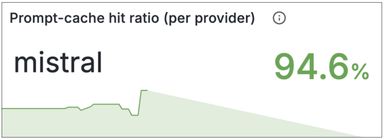
Figure 1. From my observability dashboard
Note
When I grumbled to colleagues about being surprised over the prefix design of the caching, they said that it reminded them of Docker’s layering solution. There, it’s not about specific blocks of tokens, but a thought about putting the most generic first and the most specific last for the best cache-hit result.
Some soul-searching
It’s time for some soul-searching. How come it was so hard for me to understand this single simple aspect of using an LLM in an application? I think that lack of humbleness is an important reason. I know loads about caching, I thought. :) But the circumstances and behaviour were really different this time.
That the learning took extra time because of the combinatorial effects of several problems at the same time, well, I guess that’s just normal. :)
Note
This gave me a déjà vu to 25 years ago. I was to write an article as a follow-up to my first book since I had said in the book that the runtime overhead for using guids for primary keys was relatively low. I knew that from experience in several different projects. But the measurements for the article didn't take just a few hours, as I had expected. After a few days I was still confused and totally surprised… What I “knew” had changed and turned out to be wrong.
Who cares about AI-cost?
Everybody! :) In certain contexts that’s definitely the case, it’s the only thing some people are talking about. I guess it’s going to be on more people’s lips moving forward.
Note
I asked an AI agent what was the reason that enormously much has been written about using LLMs for development, but very little about using LLMs in applications (and especially Mistral). It said that not that many care about using an LLM in an application, compared to for development. It also said that nobody would publish something like this, since they would look like an idiot after having as many problems as I have. :)
The latter is more of a motivation to me than a reason not to publish. I’m just too old to be embarrassed about that. I think it’s actually the problems others would like to hear about, so they can take shortcuts and get to interesting things more quickly on their own journeys.
Wrapping up
That was one aspect of this ”brave new world”. I guess the main advice is to… not trust what you know, but measure? :)
When I publish the upcoming articles, they will cover several aspects per article. I think I have gathered material for three more, but we’ll see.
Oh, I focused the above on the effect of prompt caching on cost and said that cost will decrease by 90% for a prompt on a cache hit. But the difference for the response time isn’t bad either. It decreases from 5s to 1s for approximately 20 000 tokens at cache hit! More people than me think that response times are important and next time we will talk about another aspect that affected response time even more than prompt caching. Stay tuned.